
Requirements
- Odoo 18 or Odoo 19. Both versions have the same features.
- Community or Enterprise. Team To-Do depends only on Discuss (
mail), which is part of Community, and uses nothing that is Enterprise-only. - Discuss (
mail). It is the only dependency. The Project app is not required. - License: LGPL-3. Free, no activation key.
Install
Install Team To-Do from the Odoo Apps Store. Pick the version that matches your database:
The technical name is cimalor_team_todo. The steps are the standard ones for any Odoo module:
- Get the module from the Odoo Apps Store for your version.
- Make it available to your Odoo. On-premise: add it to the addons path. On Odoo.sh: add it to your repository.
- Go to Apps › Update Apps List.
- Search for "Team To-Do" and click Activate.
Odoo Online (the SaaS) does not support third-party modules at the time of writing. Check Odoo's current documentation for your plan. Odoo.sh and on-premise installs do support them.
Try Team To-Do on a copy of your database first, and back up before you install or upgrade.
What happens on install
The install sets up three things.
- Users. Every internal user becomes a Team To-Do user. The app is visible right away. This also applies to internal users you create later.
- Administrators. The Odoo administrators present at that moment become Team To-Do administrators. This happens once, at install. It is not a permanent rule: an Odoo administrator you add later does not become a Team To-Do administrator. Assign the role by hand (see Roles).
- Welcome task. Each administrator receives a welcome task that explains how the app works. Drag it to Done once you have read it, or delete it. The task is created only at install, not on upgrade.
Uninstall
Warning: uninstalling Team To-Do deletes its data. Odoo removes the module's tasks and stages, and this cannot be undone except by restoring a backup. Before you uninstall, back up your database or export the tasks you want to keep. As with all Cimalor software, the module is provided as is, without warranty (see Source code and license).
Uninstalling the companion module Team To-Do: Project link removes the link between tasks and projects. It is not meant to delete the tasks themselves, but back up your database before you uninstall anything.
Configure
Two things to check after installing: who is an administrator, and what your stages are.
Roles
Team To-Do has two roles.
| Role | Sees | Creates and edits tasks | Deletes tasks | Stages |
|---|---|---|---|---|
| User | Own tasks | Yes | No | Read only |
| Administrator | Every task | Yes | Yes | Create, edit, reorder, delete |
Administrator includes User.
This controls what each user sees inside Team To-Do. It does not limit what Odoo superusers or anyone with direct access to the database can see.
Every internal user is a User automatically, including users created after install. The Administrator role is never automatic after install. Assign it by hand, also to Odoo administrators you add later.
To change a user's role:
- Go to Settings › Users and open the user.
- Open the Access Rights tab.
- In the Team To-Do section, choose User or Administrator.
Odoo administrators also have a shortcut under Team To-Do › Configuration › Users & Roles. Other users do not see it.
Stages
Stages are shared. A stage belongs to the task, not to the person looking at it. Moving a card moves it for everyone.
Three stages come out of the box: To Do, In Progress and Done. Done is folded and set as a closing stage. Module upgrades do not overwrite the default stages.
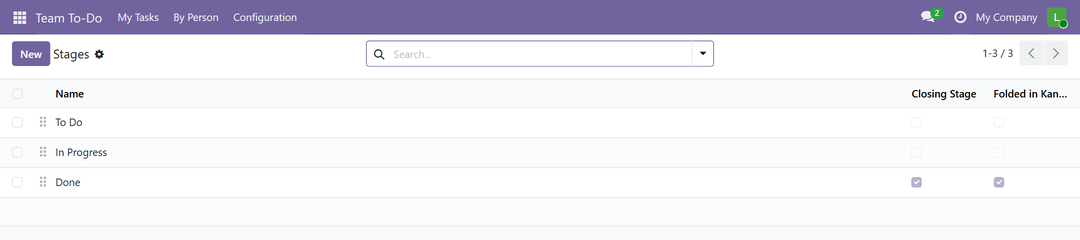
To configure stages, go to Team To-Do › Configuration › Stages. Only administrators can do this. Users can read stages but not change them. You can add your own stages and delete the ones you do not need. For each stage you can:
- rename it;
- reorder it;
- check Folded in Kanban to collapse its column;
- check Closing Stage so its tasks count as done.
The stage with the lowest sequence is the default for new tasks.
A closing stage drives the Done filter and the is_done field. It does not need to be called "Done".
Use
Every task has one owner, a stage and, optionally, a deadline and a priority.

On the form, click a stage in the stage bar to change it. The description is rich text. The chatter tracks changes of owner and stage.
My Tasks
My Tasks is your kanban, grouped by stage. Drag a card to change its stage.
Each card shows the deadline (red when overdue, orange when due today), the priority star and the owner's avatar.
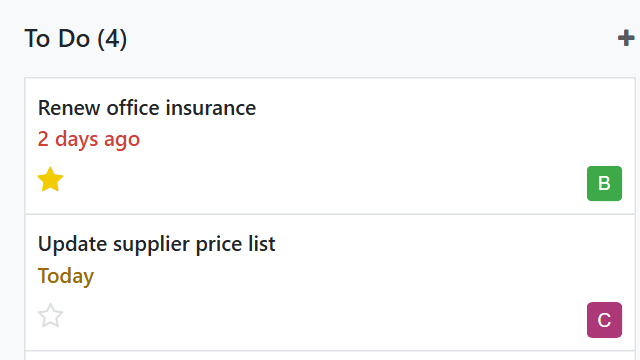
To hand a task over, change its owner. The owner is required, and there is exactly one. The task leaves your board and goes to the new owner's.
By Person
By Person is for administrators. It lists every task grouped by assignee.
To reassign a task, edit its owner. The task disappears from the previous owner's board.

Filters and grouping
- Filters: Open, Done, My Tasks.
- Group by: assignee or stage.
Link tasks to Project
Team To-Do works without the Project app. If you also use Project, install the companion module Team To-Do: Project link. It adds an optional link from each task to a project.
Install
There is nothing to configure. The module installs itself as soon as both cimalor_team_todo and project are present in the database.
What it adds
- An optional Project field on the task. It is cleared if the project is deleted.
- The project on the kanban card, as a link. It opens the task list of that project.
- A project column in the list view, a project field in the search view and a Project group-by.
Tasks without a project are not affected by this module.
Access rights
A Team To-Do user does not need Project access rights. In the standard Project app, internal users can read projects and open a project's task list. If you have changed Project's access rights, check that your users can still do this.
Troubleshooting
I cannot see the By Person menu.
It is for Team To-Do administrators only. Check the user's role under Settings › Users › Access Rights › Team To-Do.
A task disappeared from my board.
Most likely someone changed its owner. The task now sits on the new owner's board. Administrators can find it in By Person. An administrator may also have deleted it.
I cannot delete a task.
Only administrators can delete tasks.
A new Odoo administrator cannot see every task.
The Team To-Do Administrator role is not automatic after install. Assign it under Settings › Users › Access Rights › Team To-Do.
The welcome task is missing.
It is created once, at install, for each administrator who was there at that moment. It is not created on upgrade.
There is no project on my tasks.
Check that both Team To-Do and Project are installed. Team To-Do: Project link installs itself only when both are present.
Technical reference
Team To-Do (cimalor_team_todo)
- Models:
team.todo.task,team.todo.stage. - Security groups:
group_team_todo_user,group_team_todo_manager. - Access rights:
security/ir.model.access.csv. - Record rules: two, filtering tasks by owner.
is_doneon the task is a stored related field of the stage's closing flag. You can filter and group on it.- Dependency:
mail.
Team To-Do: Project link (cimalor_team_todo_project)
- Adds
project_idtoteam.todo.task: optional, cleared if the project is deleted. auto_install: True. It installs whencimalor_team_todoandprojectare both present.- The card link calls
action_open_project_tasks, which delegates toproject.project.action_view_tasks(). That is the method behind the Tasks button of the Project app, so the behavior follows what Odoo does in each version. - It returns
Falsewhen the task has no project.
This reference describes the modules as published. Internal names and behavior may change between releases.
Support
Questions and bug reports: support@cimalor.com. We aim to reply within 48 to 72 business hours. You can also open an issue on GitHub, but the reply time above applies to email only. This is a reply time, not a service level: see the Legal notice.
Source code and license
The code is on GitHub. That is also where the tests and the translation files live. Both modules are licensed under LGPL-3. See the LICENSE file in the repository. As the license states, the software is provided as is, without warranty.